

AEC
 2026-10-28
 ️26 Views
 ️Vladimír Michl
2026-10-28
️26 Views
️Vladimír Michl
Details Panel, previews, and other new features in Autodesk Desktop Connector
The new Desktop Connector 2027.3 introduces useful new features for users of the Autodesk Forma and Fusion cloud services.
The Autodesk Desktop Connector system component is primarily responsible for synchronizing cloud documents in Forma and Fusion storage with their local virtual copies. Thanks to this, you can access “cloud” files from CAD and BIM applications just as if they were local files. In addition, it understands the content of design files and can, for example, recognize their external references and display a tree of interdependencies (see the tip 14310).
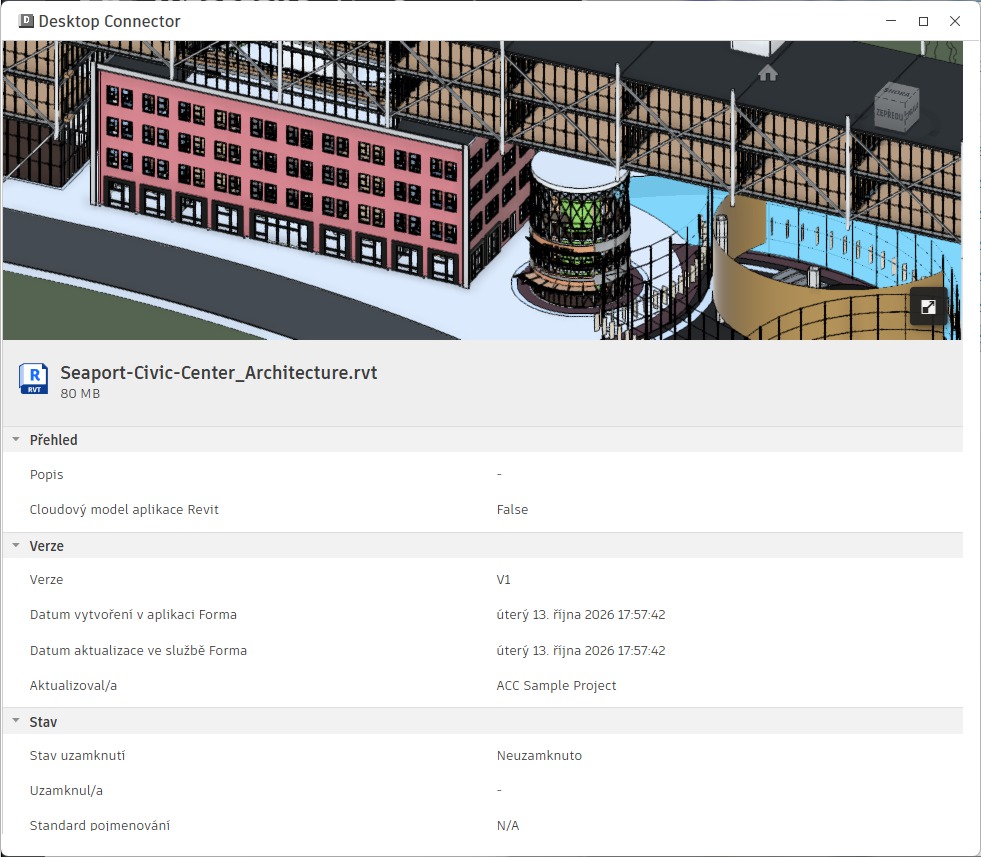
The newly released version of Desktop Connector 2027.3 offers even more features. It can display thumbnails of all supported file types, and for documents in the Autodesk Forma CDE cloud (e.g., Forma Document Management), it can also display a detailed, zoomable view of the document’s contents. This allows you to view details in RVT, DWG, or PDF files without having to open them in their native application or an external viewer.
You can find this feature in the new Details Panel - see the example:
In addition, the new version of Desktop Connector offers clearer permission update messages, notifications for archived files, and smoother updates (no need to close the application manually).
autodeskformafusiondesktop connectorcloud
Related:
