

CAD
 2018-02-27
 ️102 Views
 ️Vladimír Michl
2018-02-27
️102 Views
️Vladimír Michl
Interactive 3D models in Facebook posts
Do you know how to publish live, interactive 3D content directly on the Facebook "wall"?
One of the most popular social networks - Facebook - started to support publishing of live, interactive 3D content directly in "wall" posts in user profiles and company pages. This new function has currently a number of limitations, but it generally allows to publish simpler 3D models to explore in desktop and mobile Facebook clients, including virtual reality (VR/AR).
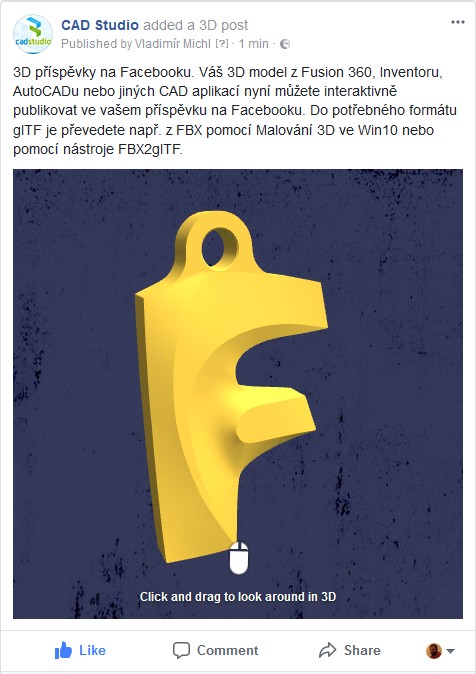
an example on CAD Studio's FB page - www.facebook.com
Facebook uses a simplified format glTF 2.0 (developed and maintained by the Khronos Group) to display 3D content - see glTF (.glb; .gltf). This format can be saved from a number of software applications, but professional CAD tools currently do not support it. That's why you need to employ conversions to publish CAD models to Facebook - the best way is over the Autodesk FBX format, or over one of the mesh formats, e.g. OBJ or STL. The easiest method for publishing 3D models from AutoCAD, Autodesk Inventor, Fusion, or Revit is the export to FBX or STL and subsequent conversion to a .glb file using the embedded application Paint 3D available in Windows 10.
To place a GLB file (model) to your post on Facebook, just mouse-drag the file to the new post window (editor) and optionally adjust the background color for the displayed model. You will need to use a web browser supporting WebGL, e.g. Chrome or Firefox (or Android FB-client). The maximum size of your GLB file is limited to 3MB, so you cannot publish more complex models (and any typical model from the BIM application Revit will hardly go through). Model textures should be in JPG, up to 2k. Any reader then can freely rotate and explore the published model. You can also publish your glTF models in VR Spaces.
To convert CAD models to glTF, you can use the methods offered in our CAD-formats-conversions wizard (see convert DWG to glTF), or one of specialized tools (mostly open-source beta versions) - examples:
To place a GLB file (model) to your post on Facebook, just mouse-drag the file to the new post window (editor) and optionally adjust the background color for the displayed model. You will need to use a web browser supporting WebGL, e.g. Chrome or Firefox (or Android FB-client). The maximum size of your GLB file is limited to 3MB, so you cannot publish more complex models (and any typical model from the BIM application Revit will hardly go through). Model textures should be in JPG, up to 2k. Any reader then can freely rotate and explore the published model. You can also publish your glTF models in VR Spaces.
To convert CAD models to glTF, you can use the methods offered in our CAD-formats-conversions wizard (see convert DWG to glTF), or one of specialized tools (mostly open-source beta versions) - examples:
- FBX2glTF - converter - FBX to glTF and GLB
- COLLADA2GLTF - converter - Collada (DAE) to glTF
- Obj2glTF - converter OBJ to glTF
- Maya3glTF - export plugin for Autodesk Maya
- BabylonJS - export plugin for Autodesk 3ds Max
- three.JS Editor - contains export to glTF
3dautodeskfacebookgltfinventorrevitvr
Related:
